Modal
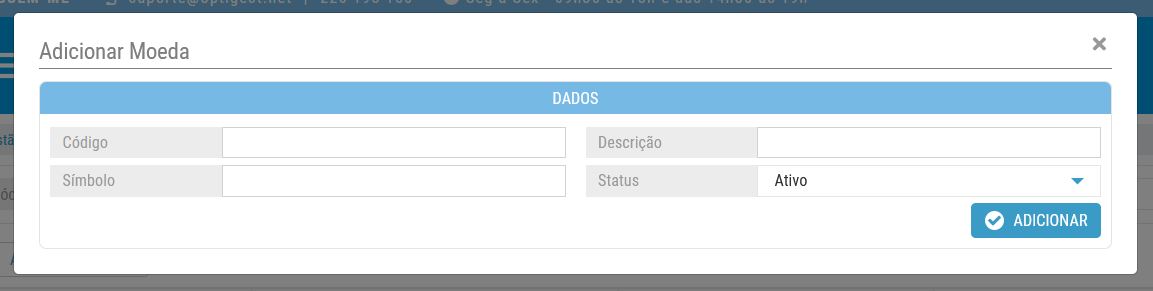
🔘 Open Modal via HTML
To trigger a modal window using a button or link:
<a class="btn btn-white modal-open"
   data-toggle="modal"
   href="currency_add_edit.php?type=ADD"
   data-target="#modal_add_edit">
   <img src="/optitravel/online/backoffice/img/icons/icon_plus_blue.svg" class="height22"> Add Currency
</a>
📐 Change Modal Width (Percentage of Screen)
To adjust the modal width, use the modal-width attribute:
modal-width="70"
This sets the modal to 70% of the screen width.
❌ Close Modal
To close a modal and return to the previous page:
echo '<script>window.location="'.$_SERVER['HTTP_REFERER'].'";</script>';
🧩 Modal Page Content (PHP + HTML)
<?php
header("Content-Type: text/html; charset=ISO-8859-1", true);
?>
<div class="col-md-12 col-sm-12 col-xs-12" id="conteudo_menus">
  <h2>Add Currency
    <button type="button" class="close floatRight" data-dismiss="modal" aria-label="Close">
      <i class="fa fa-times height22"></i>
    </button>
  </h2>

  <form name="currency_add_edit_form"
        id="currency_add_edit_form"
        method="post"
        action="/optitravel/online/backoffice/modules/data_management/static/currency_add_edit.php?type=ADD">

    <div class="col-md-12 div-geral" style="padding:0">
      <h3 class="h3-title marginBottom10"><?=DADOS?></h3>

      <div class="col-lg-6 col-md-6 col-sm-12 col-xs-12 div-filtro">
        <div class="col-lg-4 col-md-6 col-sm-6 col-xs-12 noPad">
          <label>Code</label>
        </div>
        <div class="col-lg-8 col-md-6 col-sm-6 col-xs-12 noPad">
          <input type="text" class="input-filtro code" id="code" name="code" maxlength="3" value="">
        </div>
      </div>

      <div class="col-lg-6 col-md-6 col-sm-12 col-xs-12 div-filtro">
        <div class="col-lg-4 col-md-6 col-sm-6 col-xs-12 noPad">
          <label>Description</label>
        </div>
        <div class="col-lg-8 col-md-6 col-sm-6 col-xs-12 noPad">
          <input type="text" class="input-filtro" id="description" name="description" value="">
        </div>
      </div>

      <div class="col-lg-6 col-md-6 col-sm-12 col-xs-12 div-filtro">
        <div class="col-lg-4 col-md-6 col-sm-6 col-xs-12 noPad">
          <label>Symbol</label>
        </div>
        <div class="col-lg-8 col-md-6 col-sm-6 col-xs-12 noPad">
          <input type="text" class="input-filtro" id="symbol" name="symbol" value="">
        </div>
      </div>

      <div class="col-lg-6 col-md-6 col-sm-12 col-xs-12 div-filtro">
        <div class="col-lg-4 col-md-6 col-sm-6 col-xs-12 noPad">
          <label class="floatLeft">Status</label>
        </div>
        <div class="col-lg-8 col-md-6 col-sm-6 col-xs-12 noPad">
          <select class="select-filtro" id="status" name="status">
            <option value="1">Active</option>
            <option value="0">Inactive</option>
          </select>
        </div>
      </div>

      <div class="clear"></div>
      <button class="btn btn-blue marginRight8 marginBottom8 floatRight button_submit">
        <img src="/optitravel/online/backoffice/img/icons/icon_checked_white.svg" class="height22"> Add
      </button>
    </div>

    <input type="hidden" name="action" value="ADD">
  </form>
</div>
📤 Send Additional Data via POST When Opening Modal
You can pass extra POST data to the modal when opening it by referencing a form on the page using the data-form attribute:
<a class="btn btn-white modal-open"
   data-toggle="modal"
   href="currency_add_edit.php?type=ADD"
   data-target="#modal_add_edit"
   data-form="pkt_hub_tpl_data">
   <img src="/optitravel/online/backoffice/img/icons/icon_plus_blue.svg" class="height22"> Add Currency
</a>
- The modal still loads the URL defined in the
hrefvia GET. - Simultaneously, it will submit a POST request with the data from the form element with the ID
pkt_hub_tpl_data.
This hybrid behavior allows the modal to load content while also sending necessary form data (e.g., filter context, current selections, etc.).
↑ (Last updated: 2025-03-17)